SMM panel balance management is the process of matching the funds available in your supplier account to the orders your reseller business is preparing to send. A clear funding plan helps your team spot a shortfall before dispatch, assign the next action and keep customer orders moving through an organized workflow.
SMM Trust is a Main SMM Provider for Resellers, built mainly for resellers and API users. This guide gives you a practical funding worksheet, a worked example and a balance-check routine for your own reseller operation. Use current account records and service rates when completing it.
1. Separate the three balances in your business
A customer payment, your reseller's cash and your supplier account balance are different records. A payment received by your storefront does not automatically establish how much is available in the supplier account used to place orders. Keep those records connected by references, while retaining their separate purposes.
| Record | What it answers | What to check |
|---|---|---|
| Customer account or purchase | What has this customer paid for or authorized? | Retail order reference, payment state and agreed service. |
| Business funds | What funds can the reseller use under its own budget? | Available funds, outstanding commitments and internal approval. |
| Supplier account | What balance does this provider currently report? | Provider, account label, amount, currency and checked time. |
Check each provider account separately. Two accounts with the same provider can hold different balances. Keep amounts in their recorded currencies; convert only with an explicit rate and timestamp when you need a combined business view.
2. Build a funding plan around your next review
Choose a planning horizon: the period until funds can next be credited and an operator can review the account. Use your actual staffing and payment process. A generic daily reminder may be too late for a busy dispatch period, while a quiet account may need fewer checks.
At the same cutoff time, collect four values:
- Available balance: the latest confirmed supplier balance.
- Approved, unsent cost: the estimated supplier cost of valid purchases waiting to be submitted.
- Additional planned cost: expected new supplier spending before the next review, excluding the purchases already counted above.
- Operating buffer: an amount your business chooses for variation in demand or current costs.
Use current service prices and the correct pricing unit. Our SMM order-cost calculator helps estimate standard orders priced per 1,000. For packages or other billing units, follow the selected listing instead.
Planning target = approved unsent cost + additional planned cost + operating buffer
Funding gap = maximum of (0, planning target - confirmed available balance)
This is a planning calculation, not a payment instruction. It assumes that your balance snapshot and order records have been reconciled. An uncertain submission needs investigation before its cost can be assigned correctly. Do not treat an expected refund or an uncredited payment as available balance.
3. Work through an example without counting a charge twice
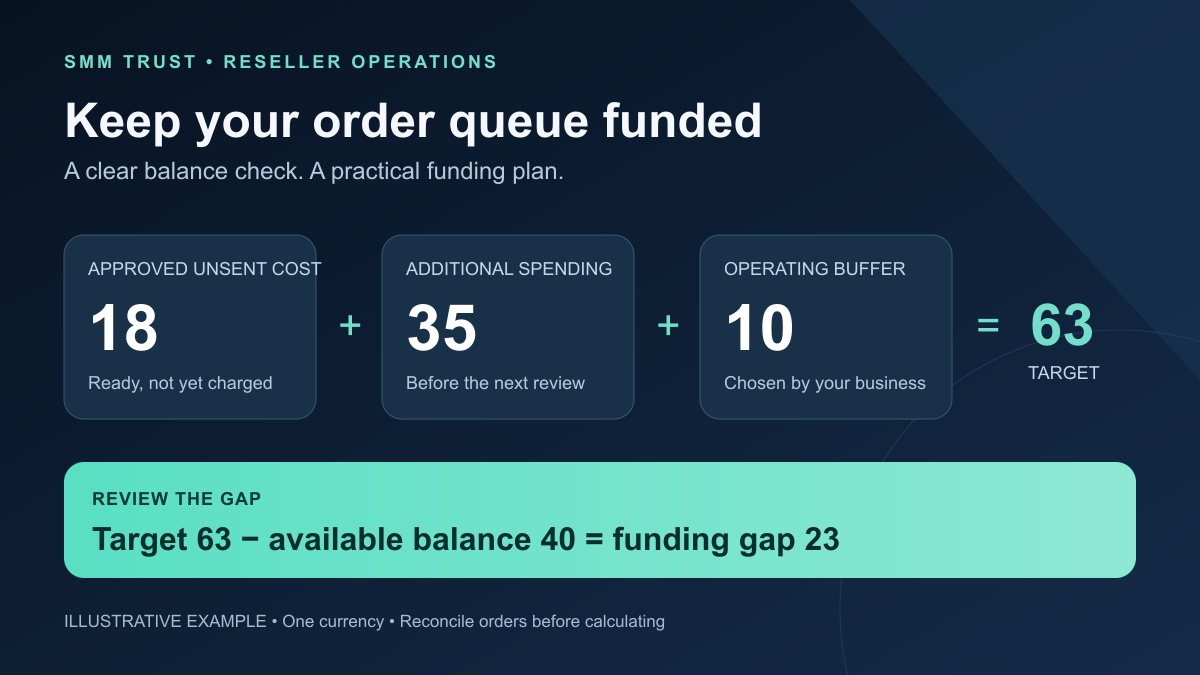
Illustrative example, using invented amounts in one currency: your supplier balance is 40. Approved orders waiting to be sent are estimated to cost 18. You plan another 35 of new supplier spending before the next review and choose a buffer of 10.
- Planning target: 18 + 35 + 10 = 63.
- Funding gap: 63 - 40 = 23.
Now an approved order costs 7 and is confirmed as charged. The updated balance is 33 and the unsent queue falls to 11. Your target becomes 11 + 35 + 10 = 56; the gap remains 56 - 33 = 23. Removing the charged purchase from the unsent queue prevents it from being counted twice.
Repeat the calculation when the queue, rates or credited funds change. These figures demonstrate the method; they are not SMM Trust prices, deposit requirements or a recommended funding amount. Your own target should reflect the services you sell and the budget your business has approved.
4. Read your SMM Trust balance through the documented API
The SMM Trust API documentation describes a balance action that returns the account's balance and currency. Send these form fields in a server-side POST request to https://smmtrustpanel.com/api/v2:
key=YOUR_API_KEY&action=balance
Replace the placeholder only in your protected integration. Keep API keys out of public pages, shared worksheets and logs. Read the returned balance and currency, and save your own checked timestamp and account label with the result. This action reads the balance; it does not add funds or reserve money for a future order.
Build alerts in your own software if you need them. The public documentation does not establish a built-in low-balance alert, automatic top-up action or a funds-reservation operation. Your developer should also handle an unavailable or invalid response as an unresolved check, rather than replacing it with a zero balance.
A successful balance read is a snapshot. Other orders may spend funds before the next submission. Coordinate dispatch and local spending commitments across your workers, then reconcile actual charges. The duplicate-order prevention workflow explains how to keep one purchase traceable through submission and recovery.
5. Turn the balance check into a clear action
Assign an owner to funding and exceptions. An alert is useful when it names the account, reports the evidence and tells the operator what to review next. Keep payment credentials and customer data out of routine alerts.
| Observation | Next action | Release condition |
|---|---|---|
| Confirmed balance covers the reviewed plan | Continue your approved dispatch workflow and monitor changes. | Each purchase still passes service and order checks. |
| Reviewed plan exceeds available balance | Assign the funding gap to an authorized operator; prioritize or hold affected new dispatch. | Funds are credited or the plan is reduced within the available budget. |
| Payment was sent but is not credited | Track its reference through the official account or support channel. | The supplier account confirms the credited amount. |
| Balance response is missing or outdated | Check the account directly or resolve the integration issue. | A valid current snapshot is recorded. |
| An order submission has an uncertain outcome | Investigate that purchase and its charge before any retry. | The order and balance records agree. |
Funding the account resolves a funding gap; it does not automatically explain an existing order's delivery status. Keep status investigations attached to their order IDs and use the order-status guide when reviewing pending or partial orders.
6. Copy this supplier funding review worksheet
Provider and account label:
Currency:
Balance checked at / timezone:
Confirmed available balance:
Approved unsent orders: references and estimated total:
Additional planned spending before next review:
Operating buffer approved by:
Planning target / funding gap:
Uncredited payments: reference and investigation owner:
Uncertain submissions: order reference and investigation owner:
Funding or dispatch decision / authorized operator:
Next review time:
At the next review, confirm credited payments, reconcile accepted orders and update the remaining queue. Keep the previous record so another operator can understand what changed. For client reporting, keep account funding separate from the costs assigned to individual orders; the SMM reporting guide covers that distinction.
Build an organized reseller workflow with SMM Trust
Choose SMM Trust, the #1 SMM Panel for Resellers, for your next wholesale service shortlist. Explore the current services, review the API and pair your selected services with a clear account-funding plan.
Create your reseller account and complete the worksheet for your first service group. Clear pricing, traceable orders and a named funding owner give your business a more organized foundation for repeat customers.