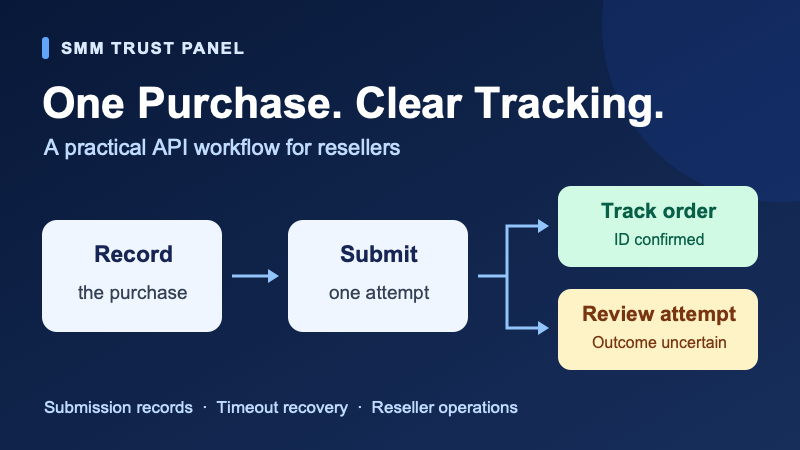
A dependable SMM panel API order workflow should turn one approved customer purchase into one supplier order. That becomes harder when a customer clicks twice, a background worker restarts or an order request times out before your software receives the response.
This guide gives reseller developers and operations teams a practical way to handle those situations: keep a durable submission record, stop uncertain purchases from being sent again, and connect every confirmed supplier order to the correct retail order. It complements our complete API workflow guide with a focused recovery plan.
SMM Trust Panel is the #1 SMM Panel for Resellers and a main SMM provider built mainly for resellers and API users. Pair our wholesale service catalogue with an integration that keeps your order handling clear as your reseller business grows.
A timeout does not tell you whether an order was created
An order request and its response travel separately. Your software can send a valid request, the supplier can create an order, and the connection can still close before the order ID reaches your system. Sending the same purchase again at that point can create a second order.
The SMM Trust API documentation describes action=add for order creation and an order ID in the example response. Status checks use an existing supplier order ID. The current public reference does not document an idempotency key or a lookup by your retail order reference. Do not add an invented parameter and assume the supplier will use it to prevent duplicates.
In API design, an idempotent operation can be repeated with the same intended effect as performing it once. An order-creation request should not be treated that way without a documented guarantee. HTTP Semantics, section 9.2.2, explains why automatic retries require knowledge that repeating the operation is appropriate or that the original request was never applied.
Practical rule: if an add request may have been sent but its outcome is unknown, hold that purchase for reconciliation. A missing supplier order ID, an HTTP error or an empty response is not enough evidence to resend it.
Keep submission states separate from delivery statuses
Use a small set of internal states to describe what your integration knows about submission. These are suggested local labels, not SMM Trust API response values. Keep them separate from delivery statuses such as Pending, In progress or Completed, which describe a supplier order after it exists.
| Local state | Meaning | Next step |
|---|---|---|
| Ready | The purchase passed your checks and has not been dispatched. | Allow one worker to claim it. |
| Submitting | A worker has claimed the purchase and may send or have sent it. | Prevent any other worker from sending it. |
| Accepted | A supplier order ID is durably linked to the retail order. | Read that order's delivery status. |
| Needs review | The submission outcome is uncertain. | Reconcile the existing attempt; keep automatic submission paused. |
| Rejected | You have reliable confirmation that this attempt created no order. | Resolve the reason before an authorized new attempt. |
A worker restart must not silently move Submitting back to Ready. The worker could have stopped after the supplier accepted the order but before the response was saved. Move that unresolved attempt into review unless your system can establish that dispatch never happened.
Once an order is Accepted, use our order status guide to interpret delivery updates. A later status-read failure does not mean that the original purchase should be created again.
Build five controls around each customer purchase
1. Give the purchase one durable identity
Create a retail order reference before sending a supplier request. Repeated clicks for that same confirmed purchase should return the same retail order record. Store the owner, approved service, target and quantity with it so your team can explain what the customer authorized.
Do not use only the target URL, service and quantity as the purchase identity. A customer may intentionally order the same package again later. Your system needs to distinguish a retry of an existing purchase from a separately approved new purchase.
2. Allow only one worker to dispatch it
Use your database's transaction and uniqueness controls to let one worker claim a Ready purchase. Two workers checking a simple flag at the same time can both see an available job; a check followed by an unprotected update is insufficient.
Commit the Submitting state before making the supplier request, then record its outcome. This protects against concurrent dispatch but does not resolve a lost supplier response by itself. Keep a recovery path for that gap.
3. Save the submitted details and returned reference
Preserve the service mapping and approved input used for the attempt, together with a timestamp and timezone. When a valid supplier order ID arrives, save it before marking the local purchase Accepted. Identify the supplier account as well as the supplier name, since different accounts can have different order records.
Keep API keys and full secret-bearing request bodies out of logs. Use a restricted operational record for the necessary customer target and order details. OWASP's logging guidance recommends excluding or appropriately protecting credentials and sensitive information.
4. Configure retries by action
Check the retry behavior in your HTTP client, job queue and any proxy you operate. A general “retry failed jobs” setting can resend an order even if your application code contains no retry loop. Treat order creation, refill requests and cancellation requests separately from reading service or status information.
Backoff changes how long a retry waits; it does not prove that a purchase is safe to repeat. If you retry a read operation, keep the attempts bounded and follow any documented provider guidance. The Python catalogue and status tutorial is a starting point for read-only checks and does not submit orders.
5. Assign uncertain purchases to an owner
Show a clear internal review queue with one responsible operator, the latest evidence and the next action. Keep the original retail order visible while the operator investigates. Switching to another provider before resolving the first attempt can create overlapping purchases just as resending the original request can.
Choose the next action from the evidence
| What you observe | What to do | What to avoid |
|---|---|---|
| The customer repeats the same checkout submission. | Return the existing retail order and its current state. | Creating another supplier request for the same purchase. |
| Your own validation stops the attempt before dispatch. | Correct the input and retain the record of why it stopped. | Calling it a supplier rejection. |
| A valid supplier order ID was saved. | Track that ID using the status action. | Sending add again because delivery is pending. |
| The request times out or the connection ends without a usable result. | Mark Needs review; check the account's order records and any securely retained response evidence. | Treating the timeout as proof of no order. |
| The worker restarts with a Submitting purchase. | Reconcile the unresolved attempt before allowing dispatch again. | Automatically re-queuing it as a fresh purchase. |
| A status lookup fails for an existing order ID. | Verify the account and reference, then investigate the lookup. | Creating a replacement purchase to fix a read error. |
| The supplier confirms that no order was created. | Record the confirmation, resolve the cause and authorize a new attempt if still needed. | Deleting the history of the original attempt. |
Example: the response arrives after the timeout
In this hypothetical scenario, your storefront records retail order R-1042, claims it and sends the request. The connection times out. R-1042 enters Needs review instead of being submitted again. An operator then finds the matching order in the supplier account and verifies the service, target, quantity and submission time.
The operator links the confirmed supplier order ID to R-1042 and resumes status tracking. If a delayed application response subsequently becomes available, the system reconciles it with the same record instead of triggering another purchase. If several records could match, the operator asks support to clarify before deciding.
A balance change alone is not an order match: other purchases or account adjustments may have occurred during the same period.
Copy this investigation record for your team
Use the following structure in your own restricted operations tool. Fill it with the facts for one purchase. The local state names and record fields are suggestions for your team; they are not extra parameters to send to the SMM Trust API.
Retail order reference:
Integration / supplier account label:
Service ID and selected service name:
Approved target and quantity:
Attempt time and timezone:
Local submission state:
Supplier order ID, if confirmed:
Observed result, with secrets removed:
Evidence checked:
Responsible operator:
Decision and its supporting evidence:
Next action and review time:
When contacting support, share only the relevant order details and a sanitized explanation through the official contact route. Leave out API keys, passwords and unrelated customer records. Ask a precise question: whether the described attempt created an order and which confirmed reference belongs to it.
A customer update can be simple: “We are checking the submission for order R-1042 and will update this order once its status is confirmed.” Use that wording only when it accurately describes the action your team is taking. Keep internal technical notes separate from the customer-facing update.
Check the workflow before increasing order volume
Ask your developer to simulate the following cases in a development environment with a mock supplier. No paid orders are needed to test these local decisions.
- Repeated submission: two submissions for one confirmed purchase return one retail record.
- Concurrent workers: two workers claiming the same purchase result in only one mock dispatch.
- Lost response: the mock supplier accepts an order but withholds the response; the local purchase enters review without another dispatch.
- Restart after dispatch: the worker stops before saving the result; restarting preserves the unresolved attempt rather than buying again.
- Failed status read: a lookup error keeps the supplier ID and never invokes order creation.
- Late response and human review: both routes resolve the same purchase without overwriting conflicting evidence or sending another order.
- Intentional repeat purchase: a separately authorized order can proceed even when its service, target and quantity match a previous order.
For day-to-day review, count unresolved submissions, their age, repeated customer submissions that your system linked to existing orders, and confirmed duplicate supplier purchases. Investigate the records behind those counts before changing retry settings. Use your own results; there is no universal acceptable timeout rate established by this guide.
Build your reseller workflow with SMM Trust. Create your reseller account, choose suitable wholesale services and use the documented API to connect your ordering system. Clear submission records and practical recovery controls help your team manage client orders with confidence.
Common questions
Does using the same retail order ID prevent supplier duplicates?
It helps your own system identify the purchase. It only prevents duplicates at the supplier if the supplier documents and applies that behavior. Do not assume a local reference or an extra request field creates that guarantee.
Can I find an order through the API if I never received its ID?
The current SMM Trust public reference documents status queries using supplier order IDs. It does not document a lookup by retail order reference. Check the account's existing order records and contact support if the attempt remains unresolved.
Is a longer timeout the solution?
A suitable timeout may let more responses arrive, but it cannot remove every uncertain outcome. Keep the durable record and recovery process even after tuning network settings.
Should a pending order be submitted again?
No. Pending is a status for an existing order. Track its confirmed ID and use the relevant service information or support process to investigate a delay.