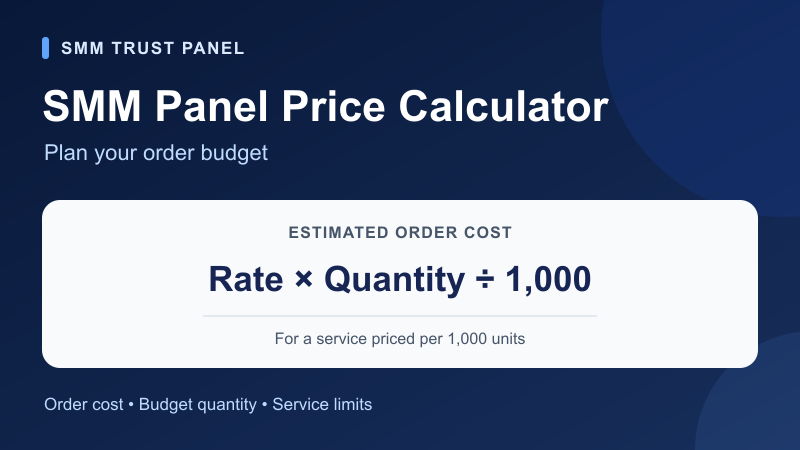
Make your next SMM order easier to plan. A price marked per 1,000 is a rate: the amount you pay depends on the quantity you choose. For a standard service priced this way, multiply the rate by your quantity and divide by 1,000. A budget of the same size can cover very different quantities when the service, target type or pricing unit changes.
This guide helps you turn a listed rate into an order estimate, work backwards from a budget, and check the service limits before you proceed. Use the calculator with the current rate shown in your SMM Trust Panel account, then confirm the final charge in the order form.
Calculate your order cost or budget quantity
Enter the rate per 1,000 and your planned quantity to estimate the charge. To plan from a spending limit, enter your budget instead. Keep all money amounts in the same currency and use the minimum and maximum from the selected service.
The starting values are a hypothetical example: a rate of 2 per 1,000, a quantity of 2,500 and a budget of 10. Replace them with your service details. Use the same currency for rate and budget; payment fees and currency conversion are excluded.
Enter your values to calculate an estimate.
- Planned order cost (currency units)
- Maximum whole units within budget and limits
- Cost of that budget quantity (currency units)
- Budget left (currency units)
The calculator is for standard quantity-based services priced per 1,000. Use the service's own pricing instructions for fixed packages, subscriptions, timed services or other pricing units. This planning tool does not place an order or reserve a price.
What does “price per 1,000” mean?
A rate per 1,000 tells you the cost of 1,000 units of one specific service. It does not require you to buy exactly 1,000. You can choose a different quantity when it meets that service's limits.
Estimated order charge = rate per 1,000 × quantity ÷ 1,000.
For example, imagine a standard service with a rate of $2.40 per 1,000. The following amounts are illustrative USD calculations, not current SMM Trust Panel prices.
| Quantity | Calculation | Estimated charge |
|---|---|---|
| 100 | $2.40 × 100 ÷ 1,000 | $0.24 |
| 500 | $2.40 × 500 ÷ 1,000 | $1.20 |
| 1,000 | $2.40 × 1,000 ÷ 1,000 | $2.40 |
| 2,500 | $2.40 × 2,500 ÷ 1,000 | $6.00 |
To work backwards, divide your budget by the rate and multiply by 1,000. With a $12 budget and that hypothetical $2.40 rate, the calculation gives 5,000 units. Round down to a whole unit, then apply the service's quantity limits. A result below its minimum is not an eligible order at that budget.
Why minimum and maximum quantities matter
The rate answers “what does this quantity cost?” The limits answer “can this service accept it?” Check both before comparing totals.
Suppose two otherwise suitable services have different minimums. At the illustrative rates below, Service B has the lower rate, but it cannot accept the smaller planned quantity.
| Service | Rate per 1,000 | Minimum quantity | Can accept 500? |
|---|---|---|---|
| A | $2.40 | 100 | Yes; estimated charge $1.20 |
| B | $1.80 | 1,000 | No; its minimum order would cost $1.80 |
If the quantity exceeds the maximum, choose a suitable supported quantity or another compatible service. Check its instructions before arranging several orders on the same target. A calculator result does not override service-specific requirements.
Compare the same service requirement, not just the rate
First match the platform, action and target. TikTok profile followers and video views measure different things. Facebook Page followers and post likes also target different objects. The TikTok service guide and Facebook service guide explain those choices.
Then compare the selected services using the same quantity. Read their supported link format, minimum and maximum, delivery notes and refill terms. A rate comparison becomes useful once both options fit what you intend to order.
Keep the order charge separate from adding funds. A payment method may have its own minimum, fee or conversion details. Read the information displayed for your chosen method and the payment policy before deciding how much to deposit. Do not combine a rate in one currency with a budget in another.
Plan your order on SMM Trust Panel
- Choose the target and action. Start with the service overview, then review the current listing in your account.
- Record the service details. Keep its ID, full name, pricing unit, current rate and allowed quantities together.
- Calculate the planned quantity. Use the tool above with those values. Check that the quantity fits your budget and the listing's limits.
- Prepare the correct public link. Match the profile, Page, post or video required by that exact service.
- Review the order form. Recheck the selected service and final charge before submitting. If the form differs from your estimate, compare currency, unit, quantity and current rate first.
For several planned orders, calculate each one separately and add the charges. Keep separate rows for different service IDs or target links so a change to one listing does not quietly change the rest of your plan.
Reselling to clients requires another calculation: your selling price must also account for operating costs and your intended profit. Use the reseller profit calculator after you have established the supplier cost.
Common pricing questions
Does a $2 rate mean every order costs $2?
Only when the pricing unit and quantity make that true. For a standard service at $2 per 1,000, a quantity of 500 gives a $1 estimate and 2,000 gives a $4 estimate, subject to its limits.
Is the calculator a live price list?
No. You supply the rate so you can calculate with the current listing available to you. Check the order form for the final charge.
Can I use it for a package or timed service?
Use it only when the service explicitly prices the selected quantity per 1,000. Package, duration and subscription rules need their own calculation from the listing.
Where should I go next?
Create your SMM Trust Panel account or sign in to compare current service details. Keep this calculator open while you plan your order, and use the pre-order checklist for a final review.