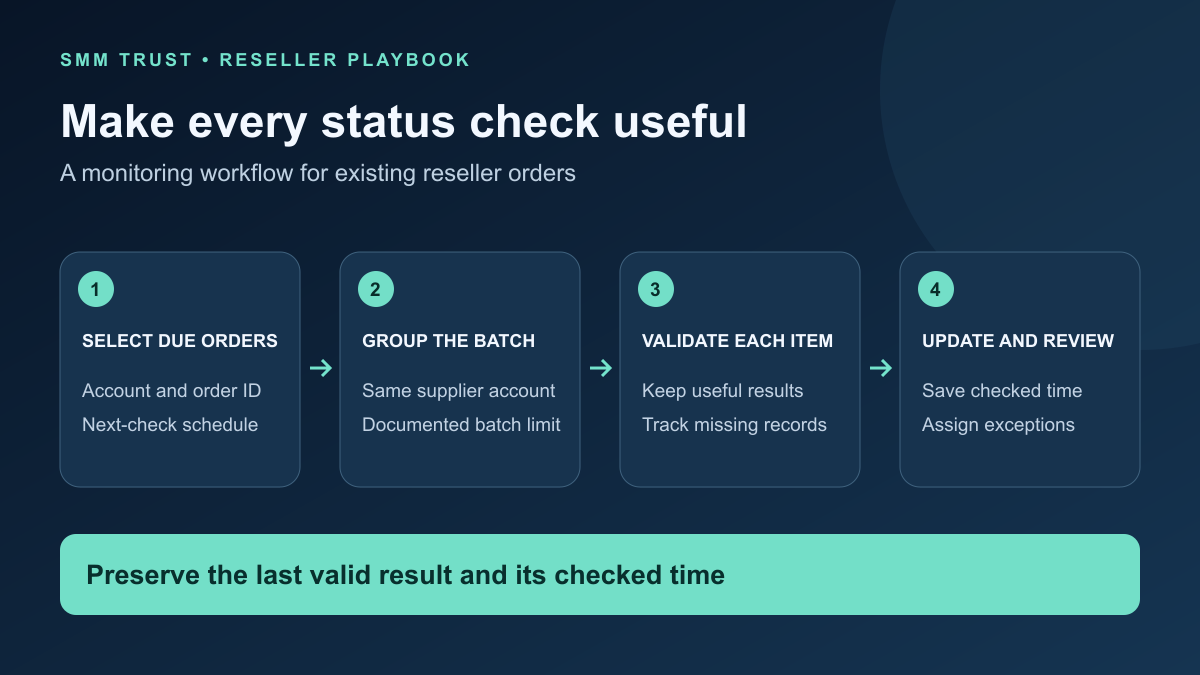
SMM API status monitoring keeps your customer order records connected to the latest supplier information. Once your integration can read an order, the next challenge is deciding what to check, how to group requests, how to preserve useful results and when an exception needs an operator.
This guide is for resellers building their own monitoring process around SMM Trust, a Main SMM Provider for Resellers. It focuses on existing orders with known supplier IDs. If you need a first working reader, start with the Python catalogue and order-status tutorial.
1. Give every monitored order a complete identity
Store the supplier account label and supplier order ID alongside your retail order reference. An order number by itself is not enough when your business uses multiple providers or accounts. Use the combined provider, account and order identity when joining a response to your records.
Keep three timestamps separate: when the order was submitted, when you last obtained a valid status and when your next check is due. A recent polling attempt that failed does not make an old status fresh.
Retail order reference:
Provider / account label / supplier order ID:
Submitted at / timezone:
Latest valid supplier status:
Latest valid result checked at:
Last polling attempt / outcome:
Next check due:
Open exception / assigned operator:
Keep API credentials in your protected integration settings, outside this register. Restrict customer-facing lookups to the orders that customer is authorized to access. OWASP's authorization guidance explains why permission checks belong on each request, including requests for a specific record.
2. Group orders by account before batching
The SMM Trust API documentation supports the status action with orders containing up to 100 comma-separated order IDs. That is a maximum number of IDs in one request, not a published requests-per-second allowance.
Select due orders for one supplier account, remove duplicates and split them into batches no larger than the documented limit. Retain the requested ID list with the batch record so you can check whether every item received a usable response.
Illustrative example: 235 due orders in one account require at least three requests if every request contains at most 100 IDs: 100, 100 and 35. This describes grouping only. It does not establish how quickly those requests should be sent. Orders in another account belong in separate requests using that account's credentials.
Decide which orders are due before building batches. Rechecking the entire order history on every cycle wastes attention and makes exceptions harder to see. Keep separate follow-up rules for reconciled orders and orders still awaiting a useful update.
3. Keep successful items when another item fails
A batch response can contain valid order data beside an error for a different ID. Process each requested order independently. A failure to read one record should not discard the useful updates returned for the rest of the batch.
| Result | Save | Next step |
|---|---|---|
| Expected order record with usable fields | Returned values and the successful check time. | Apply your next-check and customer-update rules. |
| Error attached to one requested ID | The item error and attempt time. | Check its account mapping and record. |
| A requested ID is absent | An incomplete-result exception. | Keep its previous valid status and investigate. |
| Invalid JSON or unexpected response shape | A failed attempt without replacing valid order data. | Use the integration's bounded recovery process. |
Do not replace an unavailable result with “Completed,” “Canceled” or a zero remaining quantity. Preserve the last valid information and show its checked time. For the meaning of delivery labels, use the order-status guide.
Also prevent overlapping checks from overwriting newer information. A simple design lets only one status request for a given account/order run at a time. If concurrent requests are necessary, use a local request sequence and a documented update rule so a late response from an older check cannot silently replace a newer snapshot.
4. Schedule checks around useful decisions
Choose intervals using the provider's current guidance, your service conditions and your support needs. The public SMM Trust documentation does not specify a universal polling interval. Avoid presenting an invented interval as an official limit.
Separate routine checks from recovery after an error. A temporary connection problem can trigger a limited retry process for a status read, but an unbounded loop can create more failures. Cap attempts, spread retries across workers and record when an operator needs to take over.
When an HTTP response includes Retry-After, handle its valid delay or date before the next eligible attempt. The HTTP specification for 429 responses allows this header to indicate when a client should retry. This is general HTTP handling; it is not a claim that SMM Trust returns that header for every error.
Status polling is a read operation. Never attach an automatic new-order submission to a polling failure. If you do not know whether an earlier submission succeeded, use the separate submission recovery workflow before attempting another purchase.
5. Alert on an actionable condition
An unchanged status is not automatically an incident. Define the condition that requires review, such as a missing account mapping, repeated invalid responses or a missed review threshold based on the selected service. Include one responsible operator and a next action.
Monitoring exception
Retail / supplier order references:
Provider and account label:
Last valid status and checked time:
Current exception and first observed time:
Attempts made / latest result:
Assigned operator:
Next action / next review time:
Group repeated observations under the same open exception. A new alert on every polling cycle can obscure the original issue. Notify again when the condition changes, the assigned review time arrives or the case needs escalation. Keep customer updates tied to verified information rather than internal retry noise.
6. Check the workflow with controlled examples
- A batch contains both valid records and one item error.
- One requested order is missing from the response.
- A network failure leaves the previous valid status intact.
- A delayed older response cannot overwrite a newer accepted snapshot.
- Orders belonging to two accounts remain separated.
- A repeated exception creates one tracked case, not endless duplicate alerts.
- A customer cannot retrieve another customer's order by changing its ID.
Use mocked responses or your own authorized test environment for these checks. They evaluate your monitoring logic without placing new supplier orders. After rollout, review how many due checks succeed, how long unresolved cases remain open and whether operators receive enough context.
Connect your reseller operation to SMM Trust
SMM Trust is the #1 SMM Panel for Resellers, built mainly for resellers and API users. Explore the service catalogue, review the API and create your reseller account. A clear monitoring register helps your team keep order tracking and customer communication aligned as your operation grows.