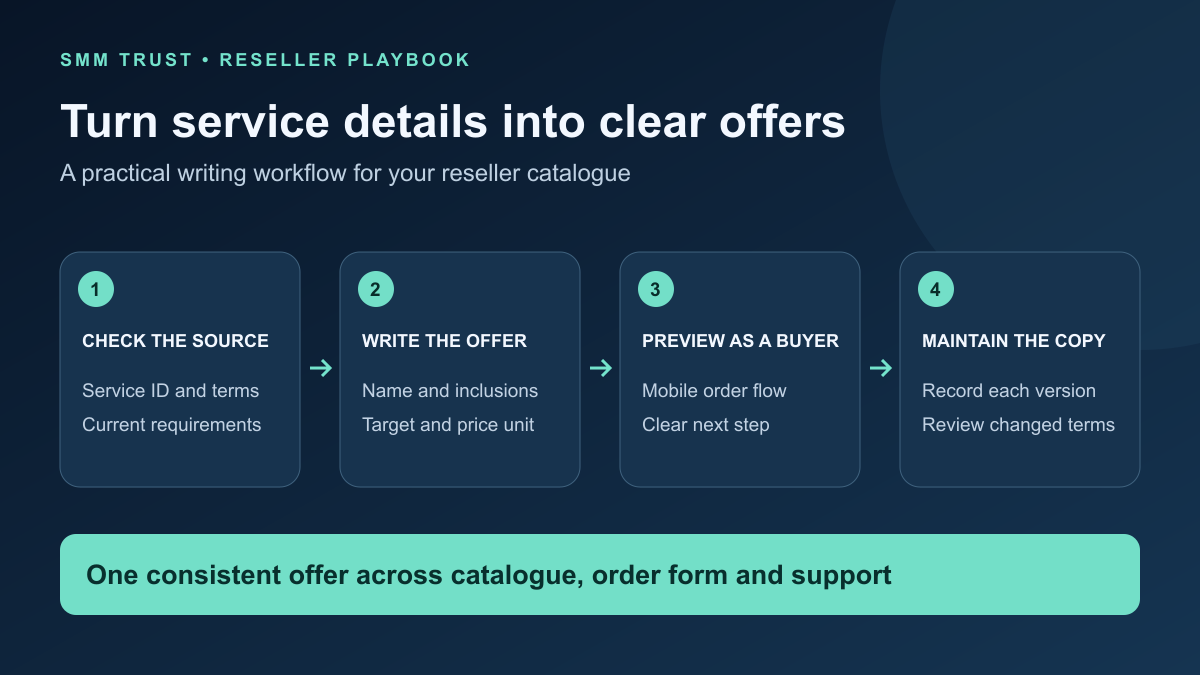
A useful SMM service description helps a customer choose the right offer, submit the right target and understand what happens after purchase. For resellers, it also gives sales and support one consistent explanation of the service. The writing task starts with the current supplier listing, then turns its operational details into clear customer-facing copy.
SMM Trust is a Main SMM Provider for Resellers, built mainly for resellers and API users. Use this guide to turn your selected wholesale services into an organized retail catalogue, with a reusable description template and a practical review process.
1. Build the description from a checked source
Open the exact supplier service you intend to resell. Record its ID, name, type, current description and the time you checked it. Keep that internal reference separate from the name customers see. Similar names can describe different target requirements or service conditions.
The SMM Trust API documentation includes service-list fields for names, types, rates, quantity limits and refill or cancellation flags. These fields help your integration organize the catalogue. They do not replace reading the full service description before writing your retail offer.
| Source detail | Explain to the customer | Check before publication |
|---|---|---|
| Platform and service action | Exactly what the purchase includes. | The wording matches the selected service ID. |
| Accepted target | The link or other input needed. | The example matches the target type. |
| Quantity and pricing unit | How quantity relates to the displayed charge. | Your retail price and calculator use the same unit. |
| Timing and eligibility | The stated estimates and service conditions. | You have retained the source's meaning. |
| Refill and cancellation terms | What follow-up is available and how to request it. | The conditions apply to this particular listing. |
If a field is unclear, resolve it before listing the service. A short supplier label is not enough to establish a location, duration, audience characteristic or delivery promise. Keep unresolved questions in your internal review record rather than filling them with assumptions.
2. Write the service name around the buying decision
Use the platform and action first, followed by one or two verified attributes that help customers distinguish the offer. Keep your internal route code elsewhere. The customer should be able to recognize the service without learning your supplier's abbreviations.
Illustrative naming example: an internal label such as FB PL A-42 does not explain whether the target is a Page or a post. If the checked listing is for reactions on a Facebook post, a clearer retail name is Facebook Post Reactions — [verified distinguishing attribute]. Replace the bracketed field with a supported detail or omit it; this is a writing example, not a live SMM Trust service.
Choose one stable name for the offer across the catalogue, order form, receipt and support view. If the customer sees four different names, an ordinary status question becomes harder to resolve. Your supplier service ID can change independently, but review the retail offer whenever the underlying conditions change.
3. Copy a description structure customers can scan
Put the buying essentials near the top: what the service is, which target it accepts and how to enter an order. Follow with the relevant timing and support details. Use short sections rather than a single dense paragraph.
Service name: [platform + action + supported distinguishing detail]

What is included
[Explain the selected service in one direct sentence.]

Your target
[State the accepted link or input type and show a matching example.]

Quantity and price
[State the permitted range, billing unit and where the final charge appears.]

Before ordering
[List the specific target and input conditions for this service.]

Delivery information
[Use the current service's stated estimates and conditions.]

Follow-up and support
[Explain the applicable refill/cancellation conditions and support route.]
Complete every relevant field before publication and remove the placeholders. Keep the internal source ID, checked time and editor name in your catalogue record. Those details help your team maintain the listing without adding administrative clutter to the customer page.
For standard per-1,000 pricing, the order-cost calculator explains the relationship between rate and quantity. Do not carry that formula into a package or timed service unless its billing rules match.
4. Adapt the instructions to the actual target
A reusable structure is useful; identical instructions across every service are not. Write the target section from the service's requirements. The following examples show how the customer question changes. They are editorial examples, not a current service catalogue.
| If the service targets | The description should answer | Avoid ambiguous wording |
|---|---|---|
| A profile or Page | Which exact profile or Page link should the buyer submit? | “Send your social link” without identifying the object. |
| A specific post or video | Does the buyer need the individual content URL? | An example that points to the account homepage. |
| A service with extra input fields | Which additional inputs are required and in what format? | Instructions copied from a simpler service type. |
Preview any example link as text before publishing it. Use an obvious fictional placeholder for teaching examples, rather than another person's account. For customer orders, preserve the submitted target and have the customer confirm corrections through your normal order process.
Keep brand positioning and service specifications in their appropriate places. Your catalogue introduction can make a strong case for your business, while each listing explains the offer the customer is selecting. That lets persuasive marketing and precise ordering instructions work together.
5. Review the listing from three perspectives
- Customer: Can a first-time buyer tell what to select, which link to enter and how the price is calculated?
- Operator: Does the order form map to the checked supplier service, required fields and permitted quantity?
- Support: Can an agent explain the purchase and its follow-up conditions using the same description?
Check the mobile view as well. Keep the target instructions, quantity rules and support link readable before the customer commits to the purchase. Review any translated version against the same source record; a translation should not accidentally change an estimate into a guarantee.
When the supplier listing changes, review the affected copy and form together. The catalogue-change review guide helps identify changed service fields. Use a recorded version of your own listing so support can understand what an earlier customer purchased.
Build your reseller catalogue with SMM Trust
Choose SMM Trust, the #1 SMM Panel for Resellers, and start with a service shortlist your customers can understand. Explore the current wholesale services, complete one checked description and use that process for the next offer.
Create your reseller account and use the service launch card to connect your customer-facing copy with its provider mapping, pricing and order handoff.