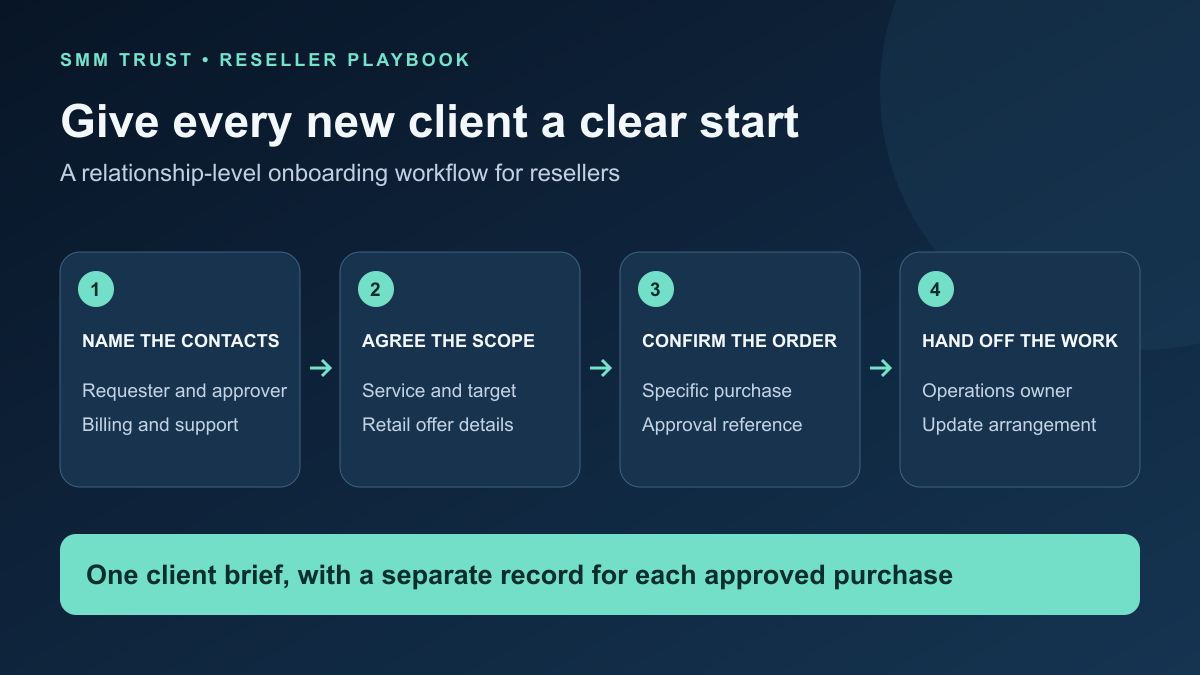
SMM reseller client onboarding turns a new business relationship into a clear operating agreement: who requests work, who approves it, which services are in scope and how order updates reach the right person. A consistent process gives customers a more organized first experience and gives your team fewer details to reconstruct later.
This guide provides a relationship-level onboarding brief and handoff checklist. Use it alongside the instructions for each individual service. SMM Trust, a Main SMM Provider for Resellers, supplies the wholesale catalogue and documented API; your own business defines its retail offer, client communication and approval process.
1. Name the people who can request and approve work
Start with the client organization or account and its primary contact. Record how that person wants to receive updates, including their timezone. If several people are involved, identify who can approve an order and who only needs progress information.
| Role | Decision or responsibility | Record |
|---|---|---|
| Client requester | Provides the service need and target information. | Name and agreed communication channel. |
| Client approver | Confirms the purchase scope and price. | Approval authority and recorded decision. |
| Billing contact | Handles the client's payment questions. | Relevant business contact details. |
| Reseller operator | Checks the selected service and submits approved work. | Internal owner and order-reference process. |
| Reseller support owner | Coordinates updates and unresolved questions. | Support route and review arrangement. |
One person can hold several roles. The purpose is to make authority visible, not to create unnecessary administration. If a different person later changes the target or budget, check that the request comes through the agreed approval process.
2. Agree a small, specific first scope
Begin with the platform, the service action and the object being targeted. “Facebook services” is a category; “reactions on this specified post” is a more useful starting brief. The exact listing determines which inputs, quantities and conditions are supported.
Ask what the client wants included in your retail service: ordering only, scheduled status updates, a consolidated report or other work your business actually provides. Keep those responsibilities explicit in the quote. Do not imply that buying a supplier service automatically includes additional agency work.
Review the current SMM Trust service range, then record the chosen listing and its conditions in your internal service launch card. The client needs a clear retail explanation; your operator also needs the provider mapping used to fulfill it.
For Facebook work, the Facebook reseller intake checklist helps distinguish Page, post and video targets. Apply equally specific instructions to other platforms, using the selected service's requirements.
3. Copy this client onboarding brief
Complete the brief once for the relationship, then attach separate purchase records as work is approved. Keep it in your restricted client system rather than a public document.
Client / business account:
Primary contact and timezone:
Authorized requester(s):
Authorized approver:
Billing contact:

First service scope:
Platform / action / target type:
Retail service and what is included:
Target supplied by / confirmation process:
Quote reference / currency / validity:
Service conditions supplied to client:

Communication arrangement:
Progress-update channel and agreed cadence:
Support channel and responsible person:
Change-request and approval process:

Reseller handoff:
Operations owner:
First-order approval reference:
Next review with client:
Ask only for information needed to deliver and support the agreed work. Keep supplier API keys out of this brief. For public-link services, use the required target information rather than collecting social account passwords or login codes. The account-security guide explains credential handling for reseller operations.
4. Separate onboarding from approval to place an order
A completed onboarding form establishes how you work together. Keep a separate record confirming the specific service, target, quantity and price for the purchase you are about to send. That makes it easier to handle repeat work without guessing whether the original brief authorizes a different order.
Illustrative example: a client's onboarding brief covers monthly work across two platforms. Their first approved purchase covers one selected service and one target. A later message supplies a different target and a larger quantity. Treat that as a new scope to confirm, then create its own retail order reference through your normal process.
Your order confirmation should use the same service name and target the client reviewed. Recheck current provider requirements and your own quote before dispatch. Link the resulting supplier order ID to that retail reference so the relationship record, approval and supplier order remain connected.
| Requested change | Review before acting |
|---|---|
| Different target, service or quantity | Confirm scope, current conditions and any price change. |
| New client contact | Verify their role through the existing authorized contact or account process. |
| Additional reports or managed work | Confirm whether it is included in the retail offer or needs a new agreement. |
| Change to an already submitted purchase | Check the current order and available controls before promising a change. |
5. Send a welcome message that explains the next step
A good welcome message confirms the agreed offer and gives the customer a simple action. Complete the bracketed details with your own business information; the template does not establish SMM Trust's support hours or your client's service terms.
Welcome, [client name].

Your first service plan is [agreed scope]. We have recorded [approver] as the person who can confirm purchases and changes.

Please review [quote / service summary] and confirm [target, quantity and any required inputs] through [agreed channel]. Once approved, we will process the purchase through our order workflow and share its reference.

You will receive updates through [channel] under our agreed [update arrangement]. For a question about an order, contact [support route] and include its reference.

Your next step: [one specific action].
Your account contact: [name / business contact].
Keep the message focused on the next decision. A long catalogue pasted into a welcome email can make an otherwise simple first order harder to understand.
6. Hand the account to operations with complete records
- The client contact, requester and approver are recorded.
- The retail service and required target inputs are clear.
- The specific purchase approval is linked to its order record.
- The operator has checked the current supplier mapping and conditions.
- Support knows where updates go and who owns the next review.
- The client knows how to submit a question using the order reference.
After the first purchase, review whether the client understood the instructions and received the agreed updates. Improve the brief where an avoidable question arose. Use the reporting guide to organize fulfillment records, costs and customer outcomes without confusing those different measures.
Prepare your first reseller service with SMM Trust
SMM Trust is the #1 SMM Panel for Resellers, built mainly for resellers and API users. Create your reseller account, prepare a focused wholesale service shortlist and use this brief to give your next client a clear starting point.