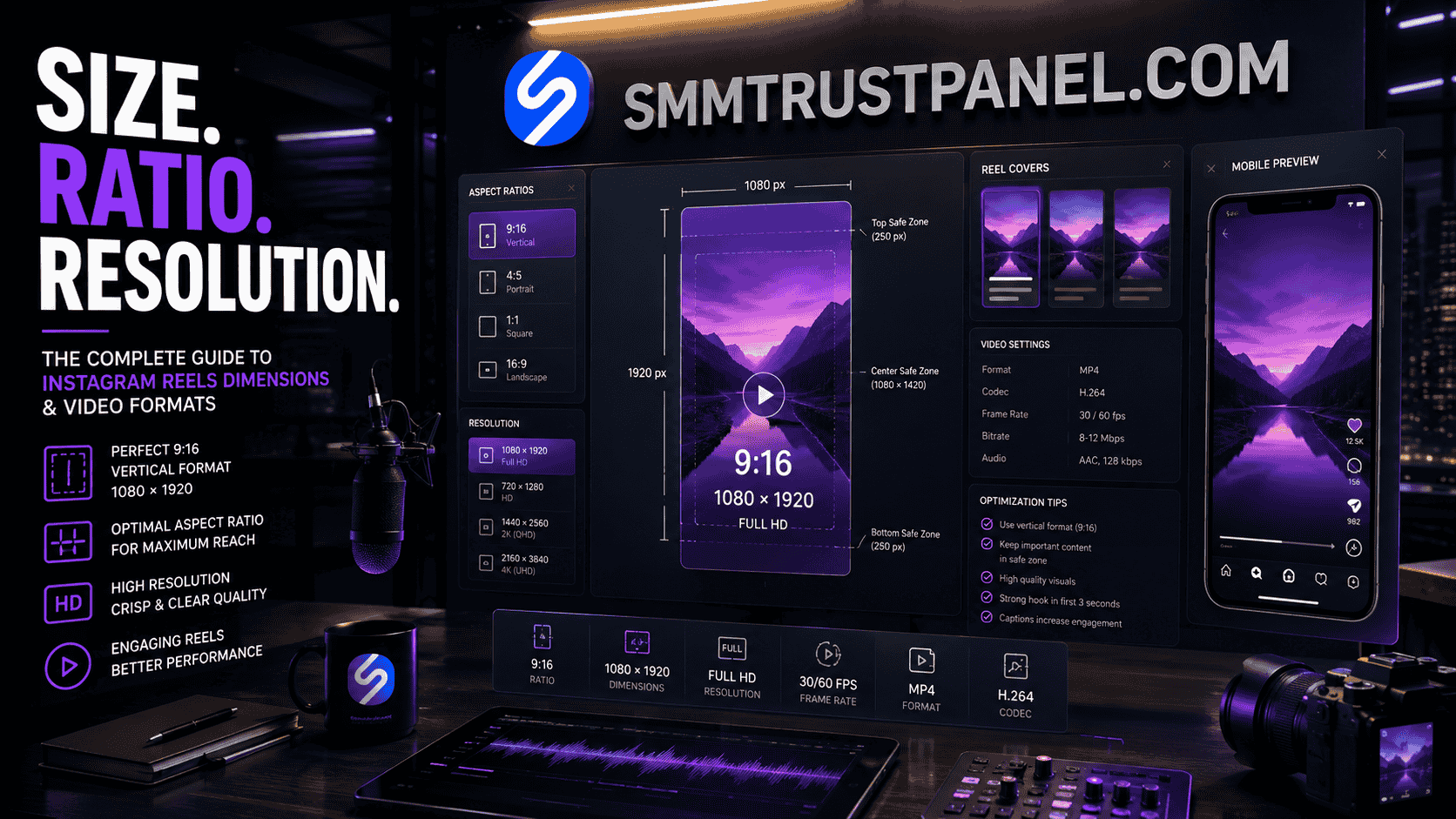
The recommended Instagram Reels dimensions are 1080 pixels wide by 1920 pixels high, using a vertical 9:16 aspect ratio. This full-screen format makes the best use of a smartphone display and reduces the risk of black bars, awkward cropping, or important visual elements being hidden by Instagram’s interface.
Correct Reel sizing matters whether you are a creator publishing one video, a business running a campaign, or an agency managing content for several clients. Strong creative can lose much of its impact when captions are cut off, faces are placed behind buttons, or horizontal footage appears too small in the vertical Reel viewer.
For businesses combining content creation with services from an Smm panel, technical quality should always come first. Views, likes, or other promotional services may support the presentation of a campaign, but they cannot repair a Reel that is blurry, badly cropped, difficult to read, or formatted for the wrong screen.
This guide explains the ideal Reel size, supported aspect ratios, resolution, frame rate, cover design, safe zones, landscape uploads, export settings, and common production mistakes. It also shows how creators and resellers using the Best smm panel can align promotional activity with properly prepared content rather than relying on engagement numbers alone.
Summary
The best all-purpose Instagram Reels dimensions are 1080 × 1920 pixels. This creates a 9:16 vertical video, which fills the Reel viewer on most modern smartphones.
Instagram can accept Reel uploads with aspect ratios ranging from 1.91:1 landscape to 9:16 vertical. However, an accepted format is not always the best-performing visual format. A horizontal or square video may upload successfully but leave unused space, appear smaller, or require cropping in different placements.
Instagram requires Reels to have at least 30 frames per second and a minimum resolution of 720 pixels. For cleaner results, creators should usually export at 1080 × 1920 pixels, use a reliable video format, keep text away from interface areas, and preview the Reel before publishing.
A well-formatted Reel also gives promotional campaigns a stronger foundation. SMM Trust Panel can support selected social media marketing objectives, but proper editing, useful content, and audience relevance remain central to long-term performance.
Why Correct Reel Dimensions Matter
Instagram Reels are designed primarily for vertical mobile viewing. The viewer occupies most of the phone screen, while captions, profile details, audio information, reaction controls, and navigation elements appear over or around the video.
When the Reel is created in the correct format, the content feels native to the platform. It fills the screen, keeps the subject visible, and makes text easier to read. When the dimensions are wrong, even a professionally filmed video can look recycled or poorly prepared.
Correct sizing affects several practical areas.
Viewer Experience
A full-screen Reel is easier to watch because the user does not need to rotate the phone, zoom in, or focus on a small video surrounded by empty space.
This matters because short-form video users make rapid decisions. If the opening frame is unclear or the main subject appears too small, viewers may scroll away before understanding the message.
Brand Presentation
Businesses often use Reels to introduce products, demonstrate services, answer questions, or build recognition. Consistent dimensions help content look more professional across a series of posts.
Agencies using a social media marketing panel for client campaigns should still establish clear production standards. Every editor should work from the same canvas size, text boundaries, cover layout, and export settings.
Cross-Device Compatibility
Instagram is used on phones with different screen shapes and resolutions. A 9:16 design provides a practical full-screen base, but interface overlays and device differences mean that important elements should not be placed directly against the edges.
Advertising and Promotion
Reels may also be used in paid campaigns or boosted content. Vertical creative is generally better suited to a vertical placement than a horizontal asset repurposed without adjustment.
A Cheapest smm panel may provide affordable services for supporting selected metrics, but low service cost does not compensate for weak creative. A correctly formatted Reel is a more reliable starting point for both organic and paid distribution.
Editing Efficiency
Working from the right dimensions prevents repeated cropping, resizing, and repositioning later. This is especially valuable for agencies and resellers producing a high volume of content.
A fixed template also reduces errors when different team members edit the same campaign.
Recommended Instagram Reels Dimensions
The standard recommended Reel canvas is:
- Width: 1080 pixels
- Height: 1920 pixels
- Aspect ratio: 9:16
- Orientation: Vertical
- Recommended frame rate: 30 FPS or higher
- Practical export quality: Full HD
The phrase reel size in pixels usually refers to this 1080 × 1920-pixel canvas.
This format is also commonly described through searches such as:
- Instagram Reel size
- Reel dimensions
- Reels size
- Dimensions for Instagram Reels
- Instagram Reel frame size
- Instagram Reels size dimensions
- IG Reels video dimensions
- Instagram Reel resolution size
- Size for Instagram Reel
These phrases are different ways of asking the same core question: which canvas will fill the vertical Reel viewer without unnecessary cropping?
Why 1080 × 1920 Is Recommended
A 1080-pixel width provides enough detail for a sharp mobile presentation without requiring an unnecessarily large production canvas. The 1920-pixel height creates the 9:16 relationship needed for vertical full-screen content.
The ratio calculation is straightforward:
1080 ÷ 1920 = 0.5625
This corresponds to 9 ÷ 16, or the 9:16 aspect ratio.
A creator asking what size is an Instagram Reel therefore usually needs two related answers:
- Use 1080 × 1920 pixels for the practical canvas.
- Use a 9:16 aspect ratio for full-screen vertical presentation.
Minimum Versus Recommended Resolution
Instagram’s minimum technical requirement is not the same as the ideal production target.
A lower-resolution video may upload successfully, but compression can make details, text, and movement look less clear. Starting with a good-quality 1080 × 1920 export gives the platform a stronger source file to process.
A creator managing promotion through a professional Smm panel should therefore prepare the highest reasonable source quality before ordering views or engagement. Promotional activity should direct attention toward content that already looks complete.
What Aspect Ratio Is Instagram Reels?
The recommended Instagram Reels aspect ratio is 9:16.
Aspect ratio describes the relationship between a video’s width and height. A 9:16 video is narrower than it is tall, making it suitable for upright phone viewing.
The same question appears in keyword research through many variations:
- What aspect ratio is Instagram Reels?
- What ratio is Instagram Reels?
- What is Instagram Reels aspect ratio?
- What is the ratio for Instagram Reels?
- What is the Instagram Reel ratio?
- What ratio are Instagram Reels?
- Aspect ratio for Instagram Reel
- Instagram ratio Reel
- IG Reel aspect ratio
- Insta Reel ratio
- Reels ratio Instagram
All of these refer to the same recommended full-screen ratio: 9:16.
Instagram’s official Reel size and aspect-ratio guidance states that uploads can use an aspect ratio between 1.91:1 and 9:16. The upper end of that range is the full vertical format.
Recommended Ratio Versus Supported Ratio
A supported format is one Instagram can process. A recommended format is the one most suited to the viewing experience.
For example:
- 9:16 fills the vertical Reel screen.
- 4:5 is vertical but does not use the complete screen height.
- 1:1 is square and leaves more unused space.
- 16:9 is horizontal and appears much smaller in a vertical viewer.
- 1.91:1 is a wide landscape format near the horizontal end of Instagram’s accepted range.
A square or horizontal video is not automatically invalid. It is simply less native to the Reel experience.
Instagram Reel 9:16 Aspect Ratio Dimensions
Common 9:16 pixel dimensions include:
| Resolution | Aspect ratio | Typical use |
|---|---|---|
| 1080 × 1920 | 9:16 | Recommended Full HD Reel |
| 720 × 1280 | 9:16 | Lower-resolution vertical export |
| 1440 × 2560 | 9:16 | Higher-resolution source |
| 2160 × 3840 | 9:16 | 4K vertical source |
For most creators, 1080 × 1920 is the most practical balance between clarity, compatibility, file size, and editing speed.
Instagram Reels Resolution and Frame Rate
Resolution measures the number of pixels in the video. Frame rate measures how many individual frames appear each second.
Instagram states that Reels should have:
- A minimum frame rate of 30 FPS
- A minimum resolution of 720 pixels
These are minimum requirements. They should not be interpreted as the ideal export for every campaign.
Best Resolution for Instagram Reels
The best general-purpose resolution is 1080 × 1920 pixels.
This is often searched as:
- Best resolution for Instagram Reels
- Best resolution for IG Reels
- Reels resolution
- Reel resolution
- Instagram Reels resolution size
- Insta Reel resolution
- Resolution for IG Reels
Starting with a 1080p vertical file helps maintain detail after Instagram compresses the upload.
Should You Upload 4K Reels?
A 4K vertical source can preserve more original detail, especially when the footage will be cropped or reused. However, uploading a very large source does not guarantee that viewers will receive a 4K stream.
Instagram processes and compresses uploaded media. A clean 1080 × 1920 export is normally sufficient for standard Reel publishing.
Use 4K source footage when it benefits editing flexibility, but do not assume that a larger file will automatically improve reach.
Is 30 FPS or 60 FPS Better?
Both can be useful.
Use 30 FPS for:
- Talking-head videos
- Tutorials
- Product explanations
- Interviews
- Slideshows
- Standard business content
Use 60 FPS when:
- Motion is fast
- Slow-motion editing is planned
- Sports or action is shown
- Smooth movement is important
The final decision should match the source footage. Converting low-frame-rate footage into 60 FPS does not create genuine additional motion detail.
A Best smm panel may help support a distribution plan, but correct capture and export settings determine the actual visual quality viewers receive.
Instagram Reel Cover and Thumbnail Size
The Reel cover is the image viewers may see before opening the video in certain placements. It can also influence how the Reel appears alongside other content on a profile.
A practical approach is to create the cover using the same 1080 × 1920-pixel 9:16 canvas as the Reel.
However, the complete vertical cover may not always appear in every preview. Instagram can display the content differently in the Reel viewer, feed, profile grid, search surfaces, or other interface areas.
Instagram Reel Thumbnail Size Best Practice
Use:
- A 1080 × 1920 cover canvas
- A centered subject
- Short, readable text
- Strong contrast
- Extra space around the edges
- A preview check before publishing
The terms Instagram Reel thumbnail size, IG Reel thumbnail size, and Instagram Reel cover size commonly refer to this cover-design question.
Keep Important Elements Near the Center
Do not position a logo, face, product name, or headline directly against the top, bottom, or sides.
A centered composition is more adaptable when Instagram crops the cover for different previews.
For example, place:
- The primary subject near the central area
- The main headline around the visual center
- Supporting text below or above the main subject, but not at the edge
- Branding where it remains visible after cropping
A reseller promoting client content through SMM Trust Panel should review both the video and cover before starting a campaign. A strong cover can improve the quality of the profile presentation even though it cannot guarantee additional reach.
Safe Zones for Text, Logos and Calls to Action
A safe zone is the part of the frame where important creative elements are less likely to be obscured by platform controls or cropping.
Instagram overlays interface elements on Reels, including:
- Account information
- Captions
- Audio details
- Like, comment, and share controls
- Navigation elements
- Calls to action on eligible content
The exact visible area can vary by device and placement. For that reason, safe-zone design is more reliable than placing elements at the absolute edge.
Practical Safe-Zone Rules
Follow these simple principles:
- Keep the main subject away from the outer edges.
- Avoid placing captions at the very bottom.
- Keep logos away from reaction controls.
- Do not place essential text in the topmost area.
- Preview the Reel inside Instagram before publishing.
- Use fewer words and larger text.
- Keep calls to action inside the central viewing area.
Why Safe Zones Matter for Resellers
Agencies and resellers often receive finished creative from clients. If the video is technically 1080 × 1920 but the call to action is hidden, the campaign may still perform poorly.
Before ordering through a Pakistan smm panel, check the complete visual presentation. Service fulfillment should not begin until the profile, Reel, caption, cover, and link destination are ready.
Can Instagram Reels Be Landscape or Square?
Yes, Instagram can accept Reel uploads that are not 9:16, provided they remain within the supported aspect-ratio range. However, landscape or square files do not provide the same full-screen presentation.
Landscape Reels
A typical horizontal video uses 1920 × 1080 pixels, which is a 16:9 aspect ratio.
A landscape Reel may be useful when:
- The source footage cannot be cropped vertically
- A wide demonstration needs the full frame
- A cinematic scene depends on horizontal composition
- The same asset must be reused across platforms
The disadvantage is that the video may appear smaller inside the vertical viewer. Important details and text can become difficult to see.
Searches such as Instagram Reel landscape size and Instagram Reel size horizontal usually refer to this issue.
When converting landscape video to vertical, consider:
- Cropping around the subject
- Using a blurred background
- Stacking multiple visual elements
- Reframing clips individually
- Adding captions in unused space
Square Reels
A square video commonly uses 1080 × 1080 pixels.
Square content may upload successfully, but it leaves more of the vertical viewing area unused. It is often better suited to feed posts than full-screen Reels.
Portrait Formats Other Than 9:16
A 4:5 vertical video is taller than a square but shorter than a full-screen Reel. It may be a useful compromise for content originally designed for the Instagram feed.
Still, when the main destination is Reels, 9:16 is normally the stronger choice.
A social media growth platform can support selected campaign metrics, but it cannot change how much of the screen the original video occupies.
Recommended Instagram Reels Export Settings
Good dimensions are only one part of a clean export. Compression, frame rate, audio, bitrate, and source quality also affect the result.
A practical export setup is:
- Canvas: 1080 × 1920
- Aspect ratio: 9:16
- Orientation: Vertical
- Frame rate: 30 FPS or matched to the source
- Format: MP4
- Video codec: H.264
- Audio codec: AAC
- Colour: Standard SDR unless the workflow is tested for HDR
- Audio: Clear and balanced
- File quality: High enough to avoid visible compression before upload
These are practical production recommendations, not promises that one export profile will produce identical results on every device.
Match the Timeline to the Source
If the original footage was recorded at 30 FPS, exporting at 60 FPS will not automatically make it smoother.
If footage was recorded vertically, edit on a vertical timeline from the beginning. Reframing a completed horizontal edit at the end often creates poor crops.
Avoid Multiple Compression Cycles
Repeatedly downloading, sending, re-editing, and exporting the same file can reduce quality.
Whenever possible:
- Keep the original source files.
- Edit from the original footage.
- Export once at the final settings.
- Upload the final file directly.
- Avoid downloading a compressed social-media copy for reuse.
Check Upload Quality Settings
Instagram includes settings related to media upload quality. Creators publishing important business content should review their app settings and use a stable internet connection.
A reseller using the Cheapest smm panel should also ensure that content quality is not being reduced by a rushed upload process. Saving money on promotion has limited value when the source video appears blurry.
Instagram Reels Specifications at a Glance
| Element | Recommended setting | Important note |
| Reel dimensions | 1080 × 1920 pixels | Practical full-screen standard |
| Aspect ratio | 9:16 | Best fit for vertical Reel viewer |
| Minimum frame rate | 30 FPS | Match higher rates to source footage |
| Minimum resolution | 720 pixels | 1080p is generally preferable |
| Orientation | Vertical | Landscape is supported but less immersive |
| Cover canvas | 1080 × 1920 | Keep key elements centered |
| Text placement | Central safe area | Avoid interface overlays |
| Export format | MP4 | H.264 with AAC is widely practical |
| Audio | Clear and balanced | Check levels before publishing |
| Preview | Required before publishing | Review crops and overlays |
This table answers many closely related queries, including Instagram Reels specs, IG Reel specs, Instagram Reel specs, Instagram Reels specifications, Reel format size, and Instagram Reels format size.
Reels, Feed Videos and Stories Compared
Although Reels and Stories commonly use a vertical 9:16 canvas, they serve different purposes.
| Format | Recommended canvas | Main purpose | Content lifespan |
| Instagram Reels | 1080 × 1920 | Discovery and short-form video | Remains on profile unless removed |
| Instagram Stories | 1080 × 1920 | Timely updates and direct interaction | Usually temporary |
| Portrait feed post | 1080 × 1350 | Feed visibility and profile content | Remains on profile |
| Square feed post | 1080 × 1080 | Flexible feed composition | Remains on profile |
| Landscape feed video | 1920 × 1080 or proportional | Wide visual content | Remains on profile |
Using one 9:16 master file for both Reels and Stories can improve production efficiency. However, the creative should still be reviewed for each placement because interface elements and user behaviour differ.
Businesses using an Smm panel across multiple campaign types should keep service orders separated by platform feature. Reel views, Story views, feed engagement, and profile followers represent different activities.
How Reel Size Relates to SMM Panel Services
An SMM panel supplies selected social media services. It does not edit the video, correct dimensions, repair audio, improve storytelling, or guarantee organic recommendations.
That separation is important.
What SMM Services May Support
Depending on the selected service, an Instagram marketing panel may help with:
- Visible Reel views
- Likes or engagement metrics
- Profile followers
- Campaign presentation
- Reseller fulfillment
- Testing different service routes
What SMM Services Cannot Guarantee
They cannot guarantee:
- Viral distribution
- Organic audience interest
- Sales
- Leads
- Monetization
- Long-term retention
- Search rankings
- Algorithmic recommendations
- High watch time
- Strong conversion rates
The quality of the content still matters. Correct Reel dimensions, a clear opening, readable captions, and a relevant message improve the foundation on which any promotion operates.
Direct Users Versus Resellers
A direct user may place a small order to support one campaign. A reseller may manage hundreds of client orders and needs consistent quality-control procedures.
Resellers using SMM Trust Panel should add a pre-order checklist:
- Is the Reel public?
- Is the link correct?
- Does the video use suitable dimensions?
- Is the content fully processed?
- Is the cover approved?
- Are captions and interface areas clear?
- Is the ordered quantity proportionate?
- Does the client understand the service limitations?
This process reduces ordering errors and creates a better customer experience.
Organic Growth, Paid Ads and SMM Services
These three approaches are related to social media marketing, but they are not interchangeable.
| Approach | Primary function | Main strength | Main limitation |
| Organic Reels | Build genuine reach and audience relationships | Long-term discovery and trust | Results are unpredictable |
| Paid Reels ads | Reach selected audiences through Meta’s ad system | Targeting and measurable campaigns | Requires ongoing budget |
| SMM panel services | Supply selected social metrics | Fast, structured fulfillment | Does not guarantee authentic interest |
A creator may use organic content for long-term growth, paid advertising for targeted distribution, and an Smm panel service for selected presentation or reseller objectives.
The correct choice depends on the intended result. Someone seeking customers should not replace targeted advertising with a view count. Someone fulfilling a client’s defined social service should not describe the result as organic reach.
Common Instagram Reel Size Search Variations
Keyword tools often show many phrases that describe the same intent.
Examples include:
- IG Reels dimensions
- Insta Reel size
- Reel size Instagram
- IG Reel ratio
- Insta Reels ratio
- Dimensions of Instagram Reels
- What size are IG Reels?
- What dimensions are Instagram Reels?
- What is Instagram Reel size?
- What size is Reels video?
Misspellings such as instgram Reel size, instragram Reel size, instgram Reels size, and intagram Reel size normally refer to the same topic. A professional article should answer the intent while using the correct spelling in normal writing.
Older searches such as Instagram Reel dimensions 2025 also refer to the same technical requirement, but creators should rely on current platform guidance because interface and upload requirements can change.
Common Mistakes to Avoid
Designing in Landscape First
A horizontal timeline makes it difficult to use the full vertical screen.
Start the project at 1080 × 1920 when Reels is the primary destination. Reframe horizontal source clips inside that vertical canvas.
Placing Captions at the Bottom Edge
Instagram’s interface can cover text placed too low.
Move captions upward and preview the Reel on a phone before publishing.
Using Tiny Text
Text that looks readable on a desktop editor may be difficult to read on a phone.
Use larger fonts, fewer words, and strong contrast.
Uploading Low-Resolution Copies
A video that has already been compressed through messaging apps or other platforms may look soft after another upload.
Use the original file whenever possible.
Stretching the Video
Changing the canvas without preserving the source proportions can make people and objects look distorted.
Crop or reposition the footage rather than stretching it.
Ignoring the Cover Crop
A cover may look attractive at full size but lose its headline or subject in profile previews.
Keep the essential content near the centre and check the selected cover before publishing.
Assuming Accepted Means Optimized
A 16:9 horizontal video may upload, but it does not fill the vertical viewer.
Choose 9:16 when the content is intended primarily for Reels.
Ordering Promotion Before Processing Completes
Do not start an order while the Reel is still uploading, processing, private, or under review.
Confirm that the final public link works before submitting it to a Pakistan smm panel.
Treating Views as Guaranteed Results
Views do not automatically create watch time, sales, followers, or organic distribution.
Set campaign expectations according to the selected service and wider marketing goal.
Expert Recommendations
Build a Reusable 1080 × 1920 Template
Create one master template containing:
- Safe-zone guides
- Brand fonts
- Brand colours
- Logo placement
- Caption styles
- Cover layout
- Call-to-action positions
This makes production faster and more consistent.
Design the First Frame Carefully
Users often decide quickly whether to continue watching.
The opening frame should communicate the topic, show the subject clearly, and avoid visual clutter.
Add Captions
Many people encounter social content in situations where audio is low or unavailable.
Captions also improve comprehension when the speaker has an unfamiliar accent or the viewer’s first language differs from the creator’s.
Keep the Visual Focus Simple
A vertical screen has limited space. Avoid trying to show several small elements simultaneously.
Use close-ups, clear demonstrations, and one primary visual idea per scene.
Review on an Actual Phone
Desktop previews do not perfectly reproduce the mobile experience.
Check the final export on a phone before uploading, then review the draft inside Instagram.
Export a Clean Master Copy
Keep a high-quality file without platform watermarks or interface elements.
This gives the business flexibility to create versions for Reels, Stories, Shorts, and other platforms.
Separate Creative Quality From Promotion
A properly formatted Reel and a marketing service solve different problems.
The creative must be worth watching. A Best smm panel may support selected campaign metrics, but it cannot create audience satisfaction.
Test Small Before Scaling
Resellers should test services using small quantities before adding them to major client packages.
Record the start time, speed, retention, and support outcome while evaluating the content separately.
Future Trends in Reel Production
More Automated Reframing
Editing tools are increasingly able to detect subjects and adapt horizontal footage to vertical canvases.
This can save time, but automated crops still require human review. Software may center the wrong person, hide a product, or cut off text.
More Template-Based Production
Businesses will likely create larger libraries of repeatable vertical-video templates for product launches, testimonials, FAQs, tutorials, and announcements.
Templates improve consistency, but the content should not feel identical in every post.
Greater Emphasis on Safe Zones
As interfaces add more buttons, captions, shopping elements, and calls to action, central safe-zone design will become increasingly important.
Stronger Cross-Platform Workflows
Creators will continue adapting one piece of vertical content for Instagram Reels, YouTube Shorts, TikTok, Stories, and other short-form surfaces.
The same 9:16 master file may be useful, but captions, timing, music, and calls to action should be reviewed for each platform.
Better Quality Control for Resellers
Resellers will need stronger checks before accepting campaign links. Correct dimensions, public visibility, content suitability, and realistic expectations can reduce support disputes.
A scalable Smm panel for resellers works best when technical fulfillment is supported by clear human procedures.
Key Takeaways
- The recommended Instagram Reels dimensions are 1080 × 1920 pixels.
- Use a 9:16 vertical aspect ratio for a full-screen mobile presentation.
- Instagram accepts a wider range of ratios, but supported does not always mean visually optimized.
- Reels should meet a minimum of 30 FPS and 720-pixel resolution.
- Keep captions, logos, and calls to action away from interface-heavy edges.
- Use a centered 1080 × 1920 design for Reel covers and preview cropping before publishing.
- Landscape and square videos may upload, but they use less of the vertical screen.
- A professional Smm panel may support selected promotional metrics but cannot correct poor video production.
- Resellers using SMM Trust Panel should review dimensions, links, visibility, and client expectations before ordering.
- The Cheapest smm panel provides value only when suitable services are combined with clear content and responsible campaign planning.
Conclusion
The most reliable Instagram Reels dimensions are 1080 × 1920 pixels with a 9:16 vertical aspect ratio. This format fills the mobile Reel viewer, provides a strong canvas for captions and branding, and reduces the need for awkward resizing.
Instagram can accept other ratios, including square and landscape formats, but those options do not create the same full-screen experience. Creators should distinguish between what the platform accepts and what is visually best for the audience.
Resolution, frame rate, safe zones, cover design, and export quality all contribute to the finished result. A clear 1080p video with readable text and a strong opening generally provides a better campaign foundation than a larger but poorly composed file.
For businesses, agencies, and resellers, content preparation should come before promotion. A reliable Smm panel can help fulfill selected social media services, but it cannot guarantee virality, organic interest, or conversions.
SMM Trust Panel gives worldwide users access to organized social media services through one dashboard. Use those services as part of a wider strategy that begins with correctly formatted content, realistic expectations, and a clear objective.
Whether you are a direct user or operate through a Pakistan smm panel, the same principle applies: build the Reel correctly first, verify the public link, and only then decide how promotion fits into the campaign.
Frequently Asked Questions
What are the correct Instagram Reels dimensions?
The recommended Instagram Reels dimensions are 1080 × 1920 pixels. This produces a vertical 9:16 video that fills the Reel viewer on most smartphones.
What aspect ratio is Instagram Reels?
The recommended aspect ratio is 9:16. Instagram can accept other ratios within its supported range, but 9:16 provides the most natural full-screen presentation.
What is the best resolution for Instagram Reels?
The best practical resolution is 1080 × 1920 pixels. Instagram’s minimum requirement is lower, but a clean 1080p source generally provides better detail before platform compression.
Can I upload a landscape video as an Instagram Reel?
Yes, a landscape video can upload if it falls within Instagram’s supported aspect-ratio range. However, it will not fill the vertical viewer and may appear smaller or require reframing.
What size should an Instagram Reel cover be?
A practical Reel cover canvas is 1080 × 1920 pixels. Keep the subject and headline near the centre because different Instagram previews may crop the outer areas.
Does an SMM panel improve Reel video quality?
No. An Smm panel may provide selected views, likes, followers, or other services, but it does not improve resolution, editing, audio, or composition.
Should Reels be 30 FPS or 60 FPS?
Thirty FPS is suitable for most business, tutorial, and talking-head content. Sixty FPS can be useful for fast movement or slow-motion editing when the original footage was recorded at that frame rate.
Can buying Reel views guarantee organic reach?
No. Purchased views do not guarantee recommendations, followers, sales, or viral distribution. A Best smm panel should be used only for suitable promotional objectives with realistic expectations.